How It Works
The RLCS Discord Bot does nearly everything for you!
The bot keeps track of the score, sources team information from Liquipedia, and even creates Twitch clips at the press of a button.
Commentators Publish Updates from #rlcs-mission-control
First, we Create a Series in the channel. The Bot responds with a template message containing all information about the series - including the current score, player names, and so on.
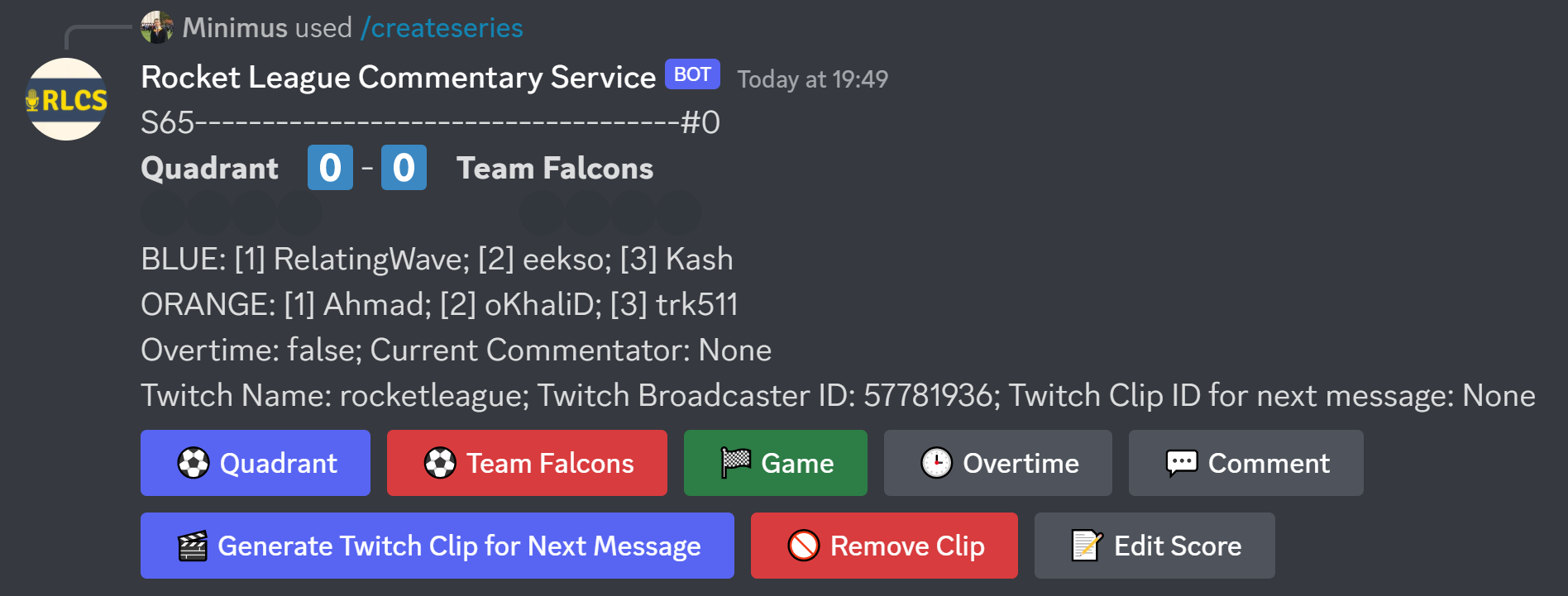
Once the series is created, Enter Commentary by pressing the appropriate action button:
| Button | Action Taken | Message Published to All Users |
|---|---|---|
| Goal (Team) | +1 to the team’s game score | Yes |
| Game | +1 to the winning team’s series score | Yes |
| Overtime | ‘Overtime’ flag set | Yes |
| Comment | Publish comment, without impacting score | Yes |
| Generate Twitch Clip | Creates a Twitch clip, which is appended to the next message | On next message |
| Remove Clip | Removes the Twitch clip that was created | No |
| Edit Score | Edit the score without publishing updates | No |
Only Commentators have access to this channel.
All Readers View Content in #rlcs-commentary
This is effectively a read-only channel: all relevant game updates should be posted by the RLCS Bot.
These bot updates can be triggered by Commentators only, from the #rlcs-mission-control channel.
Manual posts (ie. not through the Bot) are allowed - but only sparingly, to provide updates that are not supported by the Bot. For example, to share screenshots of relevant Tweets from prominent members of the Rocket League community.